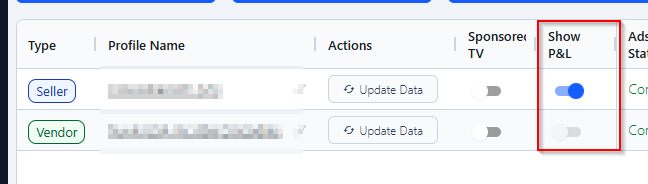
From the Manage Profiles tab, toggle on “Show P&L” for the profile you want to track.
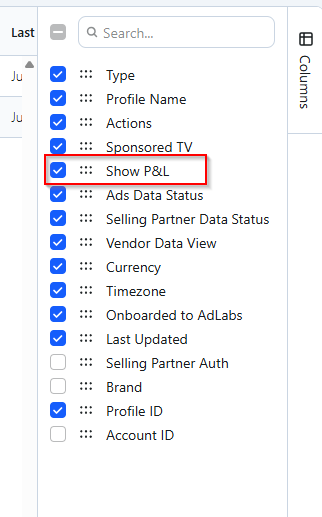
If you don’t see this column, just enable it from “columns” in the sidebar.

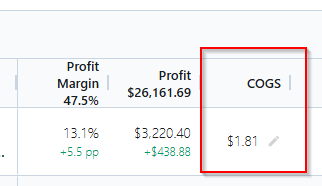
AdLabs uses COGS (Cost of Goods Sold) on a per-unit basis.
By default, AdLabs will pull any COGS data you've already shared with Amazon. If you haven't set COGS in Amazon (most sellers haven't), or if you want to override Amazon's values, you can enter your own COGS directly in AdLabs.
You can do this one-by-one or with a bulk upload.
From the Products Overview tab, enable the “COGS” column and then you can add COGS from there.
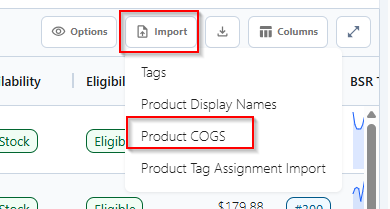
Or upload via the “Import” tab.
Once your COGS are entered, you’ll be able to enable the “Profit Margin” and “Profit” columns.
The formula is:
Profit = Total Sales - Amazon Fees - Ad Spend - COGS
Ad Spend includes all ad types at the product level: Sponsored Products, Sponsored Brands, Sponsored Display, and Sponsored TV.
Amazon Fees include everything Amazon charges against your products. The three largest are typically:
FBA Fulfillment Fees -- the cost Amazon charges to pick, pack, and ship your orders
Referral Fees -- Amazon's commission on each sale (varies by category)
Ad Spend -- your total advertising cost across all ad types (excludes SB spend)
Beyond those, Amazon reports a range of smaller fees that are also factored in:
FBA Inbound Transportation Fee
FBA Inbound Convenience Fee
FBA Storage Fee (Base Monthly)
FBA Storage Fee (Utilization Surcharge)
Long Term Storage Fee
Star Storage Fee
Low Inventory Level Fee
Fuel Surcharge
Amazon Upstream Inbound Processing Fee
Amazon Upstream Outbound Processing Fee
Amazon Upstream Storage Transportation Fee
Disposal Fee
Removal Fee
Refund Commission Fee
FBA Inventory Reimbursement
Some fee types can also credit money back to you. For example, if a customer returns a product, Amazon refunds most (but not all) of the referral fee. These credits are reflected in the profit calculation as well.
