As of September 10, 2026, the Products Overview tab combines advertising performance for each ASIN across Sponsored Products, Sponsored Brands, Sponsored Display, and Full Funnel.
This change can affect past dates, so product metrics for earlier periods may differ from what you saw before due to the addition of SB and Full Funnel performance.
Ad Type | Where the product data comes from |
|---|---|
Sponsored Products (SP) | Amazon’s reports identify the advertised product. AdLabs uses that product-level data directly. |
Sponsored Display (SD) | Amazon’s reports identify the advertised product. AdLabs uses that product-level data directly. |
Sponsored Brands (SB) | Amazon reports performance for the ad. AdLabs estimates each advertised product’s share. |
Full Funnel | AdLabs includes the data Amazon assigns to a product. Activity reported only at campaign level stays in campaign totals. |
An SB ad can feature multiple products, but Amazon does not tell us how many impressions, clicks, or how much spend each product earned.
Therefore, AdLabs uses Amazon’s purchased-product report to estimate the split.
For each day, it looks at purchases in the ad’s ad group and divides the ad’s total performance data among the products currently featured in that ad:
Impressions, clicks, and spend follow each product’s share of reported sales.
Sales, orders, and units use their corresponding sales or purchase data.
Fallback: If no purchase data is available for that ad group and day, AdLabs splits it equally.
Example
An SB ad features three products. On a given day, the ad generates $50 in spend.
Products A and B had purchases: A accounted for 60% of reported sales, B for 40%. Product C had no purchases.
Result: A gets $30 of allocated spend, B gets $20, and C gets $0.
Because spend is allocated based on sales, SB ACOS at the product level is circular. A product only gets spend allocated to it if it also had sales.
To see the performance per ad, without the estimated product split, go to the Advertised Products tab and toggle on “SB Ads”.
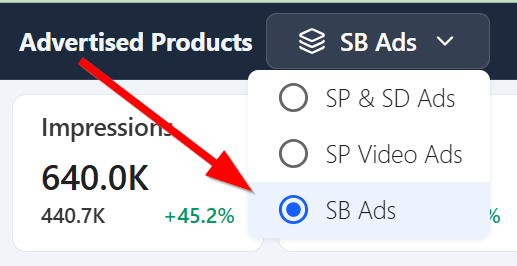
That shows performance per ad, not per product.
You can also see campaign-level performance in the Campaign Optimizer tab.
Small daily counts can be uneven because clicks and orders must be whole numbers. Widen the date range to reduce the impact of daily rounding.

Full Funnel data that Amazon assigns to a specific ASIN goes directly into that product's metrics. No estimation needed.
However, Amazon also reports some Full Funnel activity without a product assignment. AdLabs includes that in campaign totals but cannot assign it to a product row. So Full Funnel totals on the Products tab may be lower than on the Campaigns tab.
