
What Changed
Amazon removed the Selling Partner Appstore permission from the Solution Provider Portal. This means agencies can no longer authorize third-party apps (like AdLabs) on behalf of their clients through SPP permissions alone.
Instead, the client (the seller) must authorize the connection directly.
How to Connect
1. Open the connection dialog
Under “Manage Profiles”, click "Connect Seller/Vendor Central."
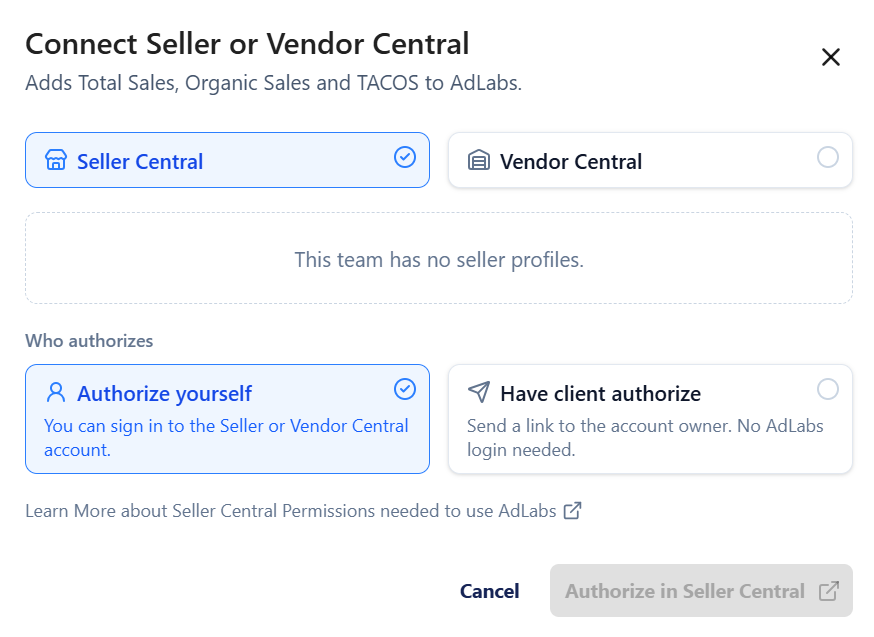
2. Choose who authorizes
Authorize Yourself -- Select this if you have direct login access to the Seller Central account and can authorize AdLabs yourself.
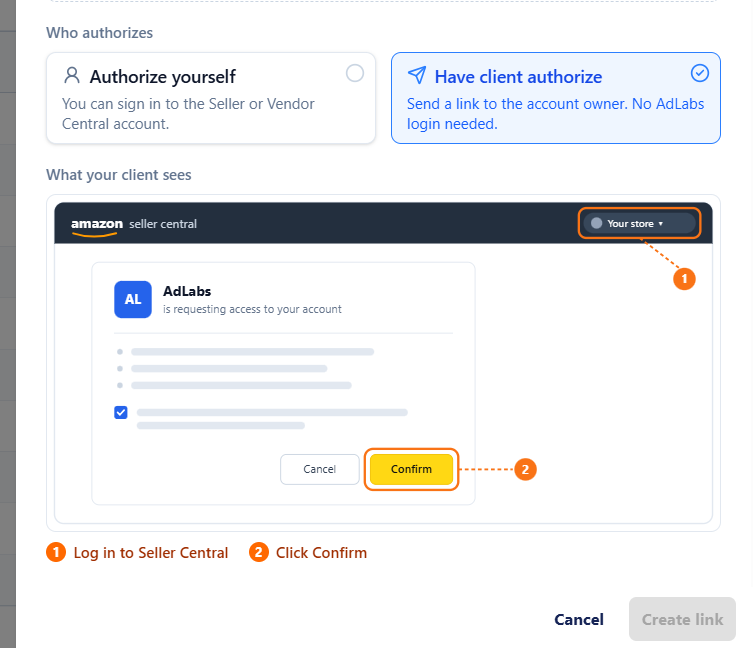
Have client authorize -- Select this if your client needs to grant access. This is the typical path for agencies managing client accounts through SPP.
If your client is authorizing, then simply send the link to your client and they can click “confirm”.

FAQ
Why can't I authorize on behalf of my client through SPP anymore?
Amazon removed the Selling Partner Appstore from SPP permissions by design. This is a platform-wide change affecting all third-party tools, not just AdLabs. The client must authorize directly using one of the two methods above.
Do I still need to be connected through SPP?
Your SPP connection gives you access to manage campaigns in the Amazon Campaign Manager. The AdLabs authorization is a separate step that the client handles. Both are needed for full functionality.
What if my client already authorized AdLabs before this change?
Existing connections are not affected. This only applies to new connections going forward.