We often see advertisers trying to optimize their ad placements based on ACOS for each placement type.
It seems logical at first. Lower ACOS typically signals better performance, so why not increase bids there at the placement level?
Because you can't separate placements from keywords.
Placements are just collections of keyword bids that happen to show up in different locations (Top of Search, Rest of Search, Product Pages).
When you set a placement modifier, you're not setting a separate bid for that placement—you're multiplying the underlying keyword bids.
For example:
If a keyword has a $1.00 bid
And you set Top of Search placement modifier to 50%
That keyword will bid $1.50 when it appears in Top of Search
The placement itself doesn't have a “$1.50 bid”, the bid is happening at the keyword level. It’s just adjusted for the different placements.
Let's look at a real example to illustrate this:

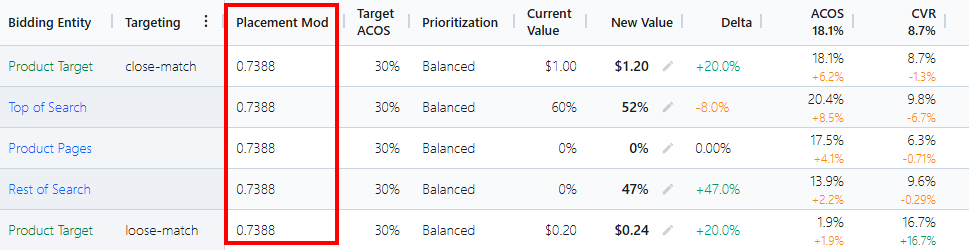
Looking at ACOS alone, you might think: "Rest of Search has the lowest ACOS at 13.9% so that's my best performer! Top of Search is worst at 20.4%, so I should scale it back."
But look at what's really happening:
Rest of Search has low ACOS (13.9%) primarily because it has lower CPC ($0.97) and a better CVR
Top of Search has higher ACOS (20.4%) because it has higher CPC ($1.48) — it's a more expensive placement
The ACOS difference doesn't tell you which placement is actually performing better. It's just reflecting the different CPCs and Conversion Rates.
The proper way to optimize placements is based on the relative conversion rates (or more specifically, Revenue Per Click) between placements.
Because the real question is: When a keyword shows up in a specific placement, how well does it convert?
Look at the conversion performance:
Top of Search: 9.8% CVR, $7.26 RPC (best performer)
Rest of Search: 9.6% CVR, $7.02 RPC (second best)
Product Pages: 6.3% CVR, $4.77 RPC (worst performer)
This tells you that when your keywords appear in Top of Search, they perform extremely well, so you should be willing to pay more (via placement modifiers) to show up there more often.
Why keep the worst placement at 0%?
Amazon doesn't allow negative placement adjustments. So we set the baseline at 0% for the worst-performing placement and scale the others up from there based on their relative conversion advantage.
That's why AdLabs recommends:
Product Pages: 0% (lowest CVR, lowest RPC - our baseline)
Rest of Search: 47% (converts better than Product Pages)
Top of Search: 52% (converts best of all placements)
Read the full explanation of how AdLabs calculates placement adjustments here.
So if placement adjustments don't control your ACOS, what does?
If you reduced placement adjustments to try to lower ACOS, you'd run into two issues:
You'd lose the ability to control the relative CPC for each placement based on the conversion rate
All placements could end up at 0%, and you might still be above your target ACOS
AdLabs adjusts your base keyword bids instead. Placement modifiers then scale up from that base bid according to their relative performance.

You might notice recommended adjustments change even for well-performing placements. This is totally normal!
For instance, if Top of Search previously had a 129% adjustment and now shows 89%, that's a -40% delta. This doesn't mean performance dropped, it means:
The calculation is using updated historical data, and the relative CVR has shifted
The placement still warrants a significant increase (89%), it’s just recalibrated based on current performance
AdLabs optimizes placements by:
Focusing on relative conversion rates between placements
Setting the lowest-converting placement to 0%
Adjusting other placements based on how much better they convert
Controlling overall ACOS through keyword bid adjustments
Recalculating from scratch each time with fresh data
Remember:
ACOS alone doesn't indicate placement performance
Your target ACOS is separate from placement optimization
Lower ACOS doesn't automatically mean a placement is performing better
This approach helps you allocate ad spend more efficiently and improve overall campaign performance.
