Many Amazon advertisers believe that product targeting (ASIN targeting) means their ads will only display on the targeted product's detail page. For example, in the "products related to this item" section.
This is only partially correct.
When you target a specific ASIN in a Sponsored Products campaign, your ad doesn't stay confined to that product's detail page. Instead, your ad follows the targeted ASIN wherever it appears on Amazon.
Therefore…
Your ads may appear in any of these locations:
On the targeted ASIN's product detail page - Yes, this includes the classic "products related to this item" section
Top of Search results - When the targeted ASIN ranks in the top positions for a search term
Rest of Search results - When the targeted ASIN appears further down in search results or on subsequent pages
Other product’s detail pages - When your targeted ASIN appears on the detail page of a product other than the one you’re actually targeting
This is the most important concept to understand:
Targeting = Which product (ASIN) you're following
Placement = Where your ad actually displays
Product targeting is about choosing which ASIN to follow around Amazon, not about choosing where your ad appears.
You can see for yourself by checking your campaign's Placement Report:
Go to the “Placements” tab in AdLabs
Click into any campaign utilizing product/ASIN targets. Group by “Placement Type” of easy analysis.
You'll see impressions, clicks, and orders distributed across all three placement types:
Top of Search
Product Pages
Rest of Search
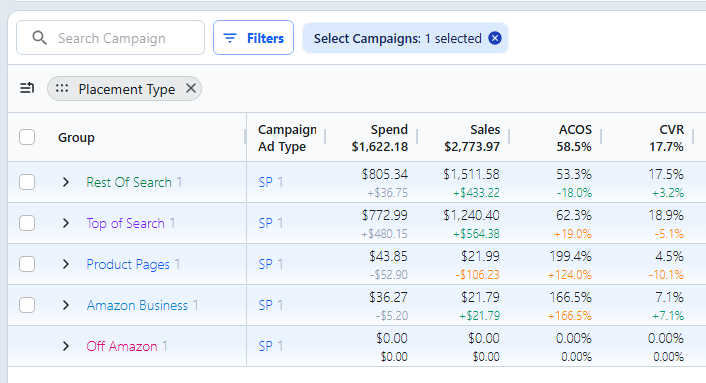
Understanding the distinction between targeting and placement is critical because ad performance varies dramatically by placement.
In most accounts, we observe:
Product Pages:
Receive the majority of impressions and spend (often 60-70%)
Have the lowest conversion rates (often 2-3x worse than Top of Search)
Generate the highest ACoS
Top of Search:
Receive a minority of impressions and spend (often 15-25%)
Have the highest conversion rates
Generate the lowest ACoS
If you're not aware of this distinction, you might:
Think your product targeting is "working" because campaign-level ACoS is on target
Miss the opportunity to shift budget from low-performing Product Page placements to high-performing Top of Search placements
Leave significant revenue on the table by inefficiently allocating ad spend
AdLabs' bidding algorithm accounts for placement performance when optimizing your campaigns:
Calculates placement-specific RPC - Determines the Revenue Per Click for each placement (Top of Search, Rest of Search, Product Pages)
Applies placement modifiers - Adjusts bids to align your Cost Per Click with Revenue Per Click for each placement
Optimizes spend allocation - Helps shift budget toward placements that drive the best results at your Target ACoS
