Amazon Advertising runs all campaigns and dayparting schedules based on the marketplace's time zone, not your local time zone.
So when you’re creating a dayparting schedule in AdLabs, you should use the timezone of that marketplace or “Profile”.
North America
Amazon.com (US): Pacific Time (PST/PDT)
Amazon.ca (Canada): Pacific Time (PST/PDT)
Amazon.com.mx (Mexico): Pacific Time (PST/PDT)
Europe
Amazon.co.uk (UK): GMT/BST (London time)
Amazon.de, .fr, .es, .it, .nl: CET/CEST (Central European Time)
Asia
Amazon.co.jp (Japan): JST (Japan Standard Time)
When you're using AdLabs' dayparting scheduler, you'll see a blue dot showing the current time in the Profile’s timezone.
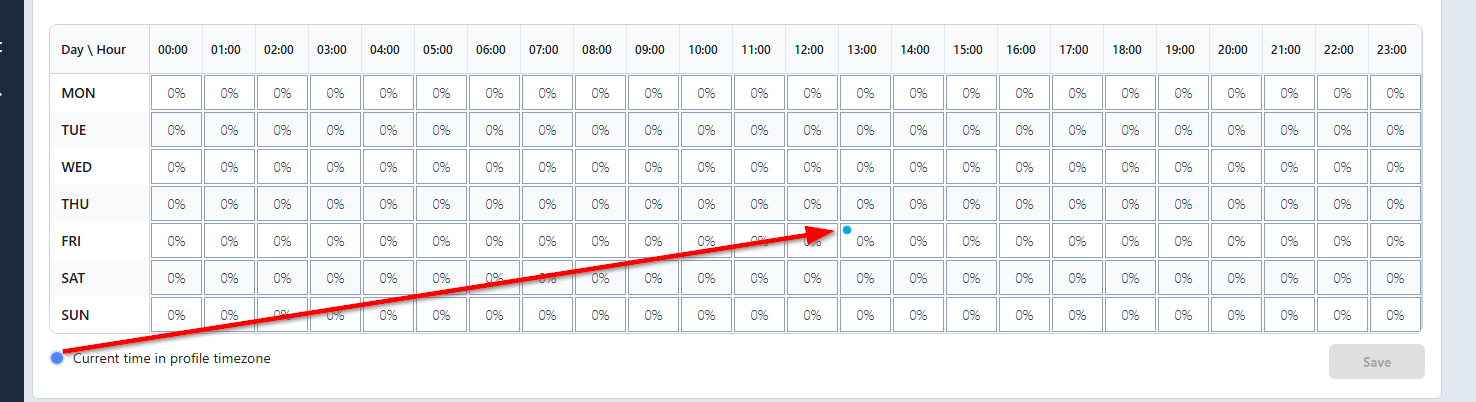
Example:
You're in New York (Eastern Time) at 5:25 PM
Managing campaigns for Amazon.com (Pacific Time)
The blue dot shows 2:25 PM
This is normal. The blue dot reflects where you currently are in Amazon's operational day, not your local time.

Use your actual hourly performance data, not assumptions about when customers shop.
AdLabs has a handy calculator to help you do this quickly and easily!
Get the Calculator here.
And the full tutorial video is below.
