If you're experiencing slow load times, timeouts, or general sluggishness in AdLabs, the issue might not be the platform, it could be your account structure. We regularly see accounts with hundreds of thousands of targets, ads, or negatives that are creating performance bottlenecks.
The Technical Reality: When your account has 20,000 products, 300,000+ campaigns, 2 million targets, or 4 million negatives, AdLabs has to process all of that data every time you:
Load a dashboard
Run a report
Apply filters
Update campaigns
Pull API reports
Most of this data is just noise:
Permanently paused targets that were never archived
Keywords with zero impressions in 180+ days
Harvested search terms that never got spend
Old experiments that were never cleaned up
The result? Everything in AdLabs runs slower.
While every account is different, here are common patterns we see in problematic accounts:
Red flags:
300,000+ targets with modest monthly sales (e.g., $10k-30k/month)
Millions of negatives accumulated over years
Hundreds of thousands of dead targets that are paused but not archived
Tons of inactive products
Common sense check: If you're spending $10,000/month, do you really need 500,000 active targets? Most of them will never see enough data to be actionable anyway.
Here's a quick process to improve AdLabs performance by removing the junk:
Step 1: Archive Old Campaigns/Targets
From the Campaign Optimizer tab, filter for any paused or enabled campaigns with zero impressions in the last 365 days.
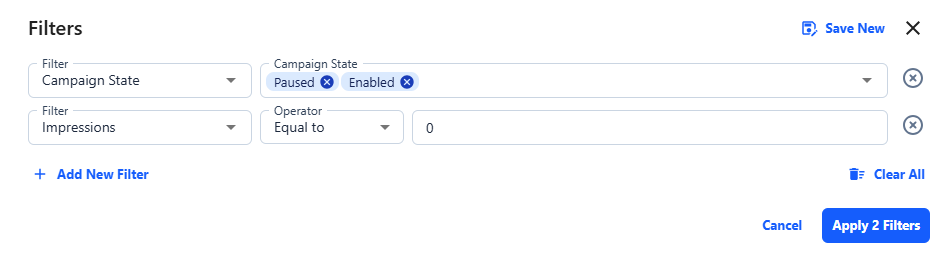
Scroll through the campaigns to make sure there’s nothing you might need later. If they haven’t been used in a year though, you’re probably good to go.
Then, select the campaigns to archive, click "Bulk Actions” from the action bar, “Change Bid State” and select “Archived”.
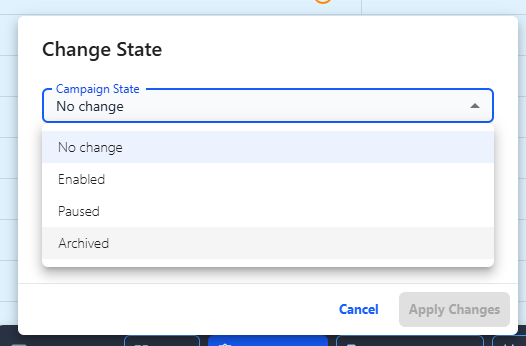
Note that once campaigns are archived, targets will automatically be archived as well. However, if you don’t want to archive an entire campaign you can do the same process as above but for targets.
Step 3: Archive Negatives
If you have millions of negatives, review whether all of them are still necessary and archive negative keyword lists that aren't actively being or are maybe no longer relevant.
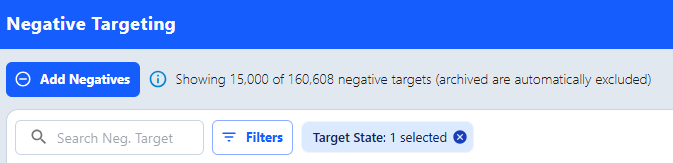
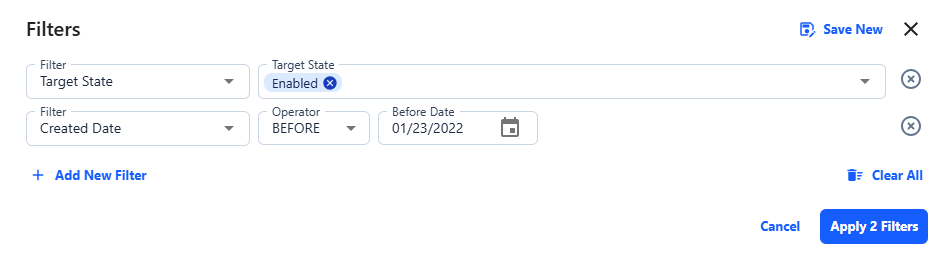
In the “Negative Targeting” tab in AdLabs, filter for negative targets that are enabled and review them. Please not that we are only able to show up to 15,000 negatives at a time so you may need to look through additional pages
Bonis tip: You can also filter by “Created Date” within the Negative Targeting tab.
Within minutes of cleanup, you should notice AdLabs loading faster and responding more quickly to your actions. Happy optimizing!
