
Percentage vs. Percentage Points in AdLabs
You might have noticed that certain metric comparisons are expressed as “%” and others as “pp”.

So what’s the difference?
Percentage change measures how much a value changed relative to its starting point.
Percentage point change measures the raw difference between two percentage values.
Example: ACoS went from 20% to 25%.
Percentage change: +25% (it increased by 25% of its original value)
Percentage point change: +5 pp (it moved 5 percentage points)
Both are correct, but they tell different stories. This is especially noticeable at small base values — an ACoS move from 5% to 10% is "+100%" in percentage terms but only "+5 pp" in percentage point terms.
Which Should You Use?
For ACoS, CVR, and CTR comparisons, percentage point (pp) change is usually more intuitive and less prone to misinterpretation. It shows the actual magnitude of the shift.
For dollar-based metrics like spend, sales, or revenue, percentage change is the right choice since these aren't percentage-based metrics, so percentage points don't apply.
How to Toggle in AdLabs
Navigate to any dashboard with comparison columns and click on the “Options” button.
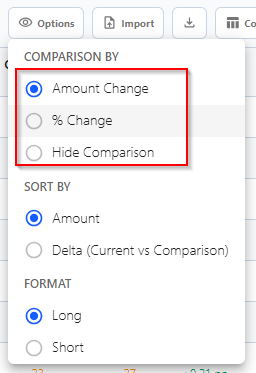
From there, you can choose your desired setting.