For seller profiles in EU and UK marketplaces, Amazon reports sales figures gross of VAT. This can make your ACOS, TACOS, and other sales-based metrics appear skewed because the VAT is baked into the sales numbers.
AdLabs lets you set a VAT percentage per profile, which is then deducted from all sales figures across PPC, DSP, and Total Sales. This gives you a cleaner, more accurate view of your actual performance.
This feature is available for seller profiles in EU and UK marketplaces only (BE, DE, ES, FR, IT, NL, PL, SE, TR, UK, IE). The VAT column will only appear if you have an eligible profile. Vendor profiles do not need this adjustment.
Go to your Profiles page in AdLabs
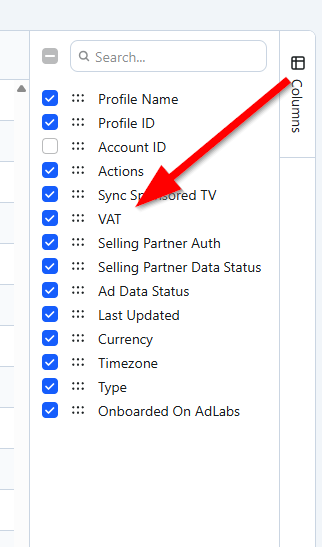
Open the column selector and enable the "VAT" column
Enter your country's VAT rate for each eligible profile (e.g., enter 22 for 22%)
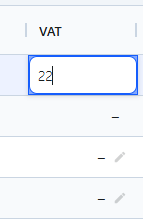
Once set, the VAT percentage is deducted from all sales numbers, which then carries through to every calculated metric where sales is used (ACOS, TACOS, RPC, etc.).
VAT is applied at the profile level, not the product level. If you sell products with different VAT rates (e.g., food at 6% vs. clothing at 22%), AdLabs cannot break this out per product. The profile-level rate is applied uniformly across all sales for that profile.
Changes apply to both Ad Sales and Total Sales.
AMC data is not affected by this setting.
